OptIQ Lab
A local web UI for the four things you'd do on your laptop: chat with a model, quantize a new one, fine-tune a LoRA adapter, and build a dataset. Boots in one command, all four workflows visible from the sidebar.
Install + launch
$ pip install "mlx-optiq[lab]"
$ optiq lab                       # UI on :7860, no model loaded
$ optiq lab --model mlx-community/Qwen3.5-9B-OptiQ-4bit  # UI + API on one process
First launch lands on /setup; pick a password. Subsequent launches go to /login. Defaults to http://127.0.0.1:7860 for the UI and http://127.0.0.1:8080 for the API server (which is what you point Claude Code / Codex / etc. at).
The four workflows
Chat
Streaming playground against whichever model the API is serving. Three built-in tools the model can call locally:
- web_search: DuckDuckGo search plus a
urlmode to fetch a single page as compact markdown. No API key required. Snippet replies end with a hint telling the model to fetch the URL when snippets aren't enough. - python: runs Python in a three-tier sandbox (apple/container if installed, else macOS sandbox-exec, else subprocess with rlimit). AST safety checks block
os.system, signal tampering, and direct network calls. Matplotlib charts saved by the model render inline in the chat (the sandbox captures any PNG / JPG / SVG written to its workdir and base64-inlines them in the tool card without the model seeing the payload). - terminal: runs a bash one-liner in the same sandbox. Dangerous commands (
sudo,curl,rm, etc.) are rejected at command position, with token-aware parsing soecho "do not use sudo"still works.
Local models often emit malformed tool calls. The Lab heals six common shapes (Hermes <tool_call> tags, fenced JSON, bare objects, trailing commas, fancy quotes, function-call style) before dispatching, so the model "just works" without needing native tool-call support. Healed calls are flagged with a small healed chip on the tool card.
The tool loop is server-side, capped at 25 turns. Consecutive identical calls de-duplicate to a nudge rather than re-running the sandbox (failed calls are exempt so the model can iterate on a fix). Tool errors get a recovery nudge automatically appended to the result. If the model still refuses to finish after 25 turns, the orchestrator forces one final tools-disabled re-prompt so the user gets a text answer instead of a hard error. A Stop button cancels the run at any time and SIGKILLs any subprocess the sandbox is holding.
Multi-step tool runs collapse into a single "N tool calls" accordion in the thread so a five-tool chain doesn't visually swamp the conversation. The most-recent group auto-expands; older ones collapse when assistant text comes in after.
Per-message controls for temperature, max tokens, and enable_thinking. File attach supports plain text, code (Python, JS, Go, Rust, TS, etc.), Markdown, JSON, CSV, PDF (via pypdf), and DOCX (via docx2txt). Image / audio are deliberately out of scope. Saved chats persist to ~/.optiq/lab/chats/.

Quantize
Four-step wizard: paste an HF model id → pick BPW + reference mode → live progress on the sensitivity + knapsack + convert phases → save locally and optionally push to your HF account with one click. Detects supported architectures (Qwen3.5/3.6, Gemma-4) and warns on untested ones.

Fine-tune
LoRA on top of any OptIQ quant. MLX-native, no PyTorch. Sensitivity-aware rank scaling (by_bits default) baked in. Live train-loss sparkline streamed from mlx-lm's TrainingCallback. Save adapter + push to HF.

Build dataset
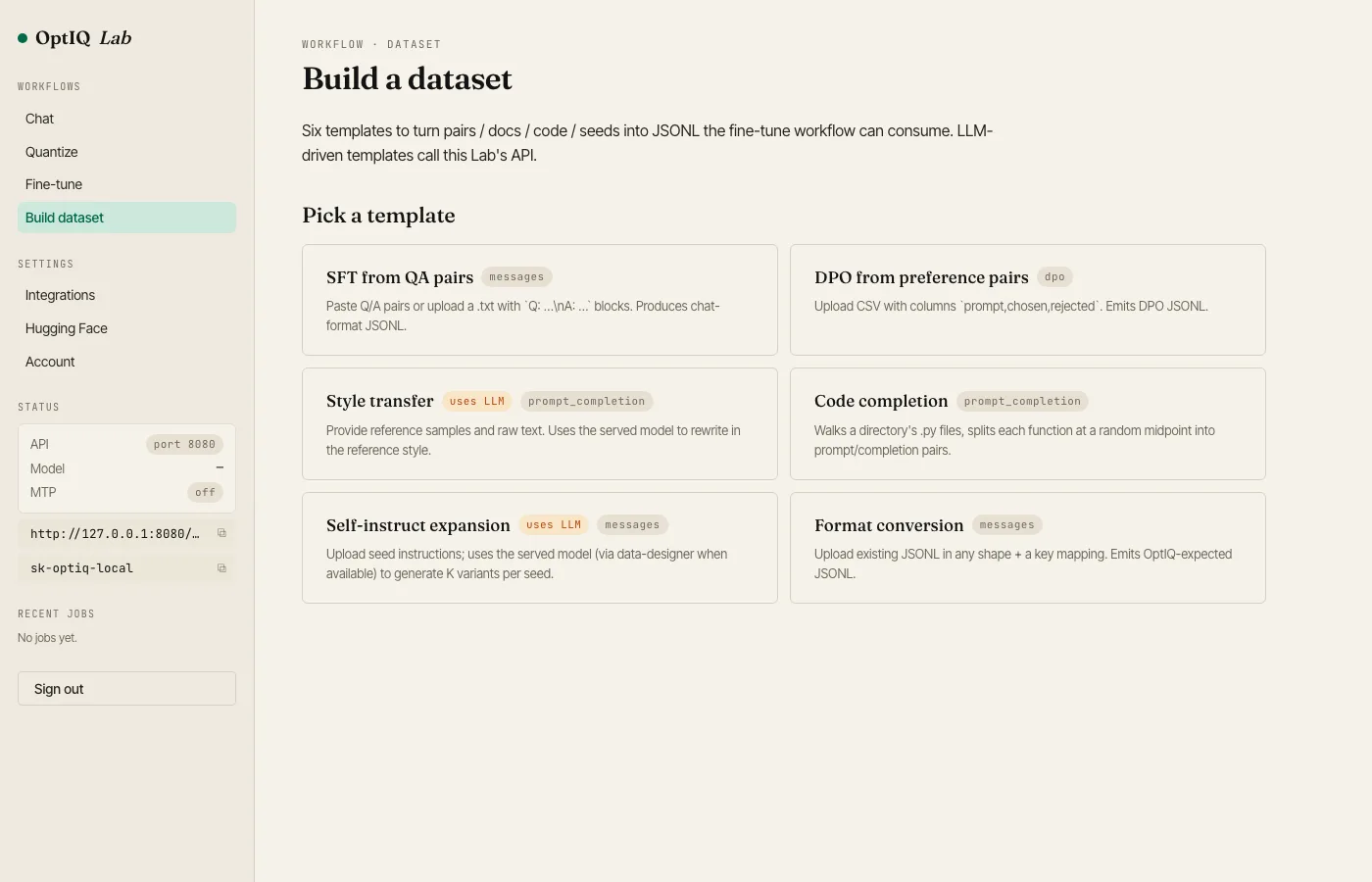
Twelve templates to turn pairs / docs / code / seeds / target text / scenarios into JSONL the fine-tune workflow can read. LLM-driven templates call this Lab's own API server, so generation runs against the model you have loaded. Reasoning is auto-disabled on the generation calls so a thinking model doesn't burn its token budget on the <think> block before answering.
- SFT from QA pairs: chat-format from Q: / A: blocks
- DPO from preference pairs: chosen/rejected from CSV
- Style transfer: uses the loaded model to rewrite text in a reference style
- Code completion: walks .py files, splits each function at a random midpoint
- Self-instruct expansion: uses the loaded model to generate N variants per seed
- Format conversion: remap any JSONL's keys into the OptIQ shape
- Prompt reconstruction: work backwards from a target paragraph. The model infers a plausible user prompt and writes a generic AI draft; the assistant target stays the original verbatim so facts and formatting are preserved for rewrite / brand-voice fine-tunes.
- Multi-turn chat synthesis: from a seed user prompt, alternates model-as-assistant and model-as-followup-user calls to build an N-turn conversation in messages format.
- Tool-use traces: takes OpenAI-format tool schemas plus scenario prompts and mocked tool results; the model picks a tool and arguments, the mock comes back as a
role=toolmessage, the model writes the final answer. Output is messages-format with a top-leveltoolsfield, the shape mlx-lm's trainer accepts for tool-call fine-tunes. - RAG Q/A from documents: chunks pasted text by blank lines (gluing small fragments together to a minimum size). For each chunk the model writes a question whose answer is in the passage and a grounded answer. The chunk goes into a system message so the trainee learns to use provided context rather than memorize.
- Reasoning trace (CoT) synthesis: for each question the model emits a
<think>…</think>trace plus a final answer. If the model forgets the tags we wrap them around the response automatically. Matches the Qwen3 / GPT-OSS reasoning convention so the dataset is drop-in for reasoning-channel fine-tunes. - Verified code generation: for each natural-language spec the model writes a function plus three
assertstatements; we run the asserts in the sandbox and tag each row withverified: true/false. Failed rows are kept (with the verifier error captured in metadata) rather than dropped, so the user can filter to the verified subset or train on everything and learn to be careful.
Datasets push to HF as repo_type="dataset".
Integrations
The Lab's Settings → Integrations page hosts copy-paste configs for Claude Code, Codex, OpenCode, OpenClaw, and Hermes Agent. Every snippet is parameterised on the live API URL.

Hugging Face token
Save a write-scope token once in Settings → Hugging Face and the Quantize / Fine-tune / Dataset workflows reuse it for one-click HF push. The token is encrypted at rest with a Fernet key derived from your Lab password (losing the password means losing access to the saved token).

How it's structured
The Lab is a Flask app (optiq.lab.create_app) mounted on its own port. optiq lab also boots mlx_lm.server in a daemon thread, so users get one process, two ports: UI on 7860, API on 8080. Background work (quantize, train, dataset generation) runs in multiprocessing.Process workers, with progress streamed back to the UI via SSE.
--host 0.0.0.0. Password protection is still enforced when you do, but please don't expose it to the public internet; this is a local development tool, not a hosted service.