Approval & permissions
OptiQ Code keeps you in control of anything that touches your files or shell. Read-only tools always run; mutating tools are gated by the approval mode.
What is gated
| Always run | Gated (need approval) |
|---|---|
| read_file · search · run_tests | write_file · edit_file · bash · git |
Reading, searching, and running your test suite never change anything, so they run freely. Anything that writes a file, runs a shell command, or touches git pauses for you.
Approve mode (default)
Each mutating call pauses with a preview of exactly what it will do: the file and the diff, or the command. Press Enter to allow it once, a to allow it for the rest of the session, or n / Esc to deny.
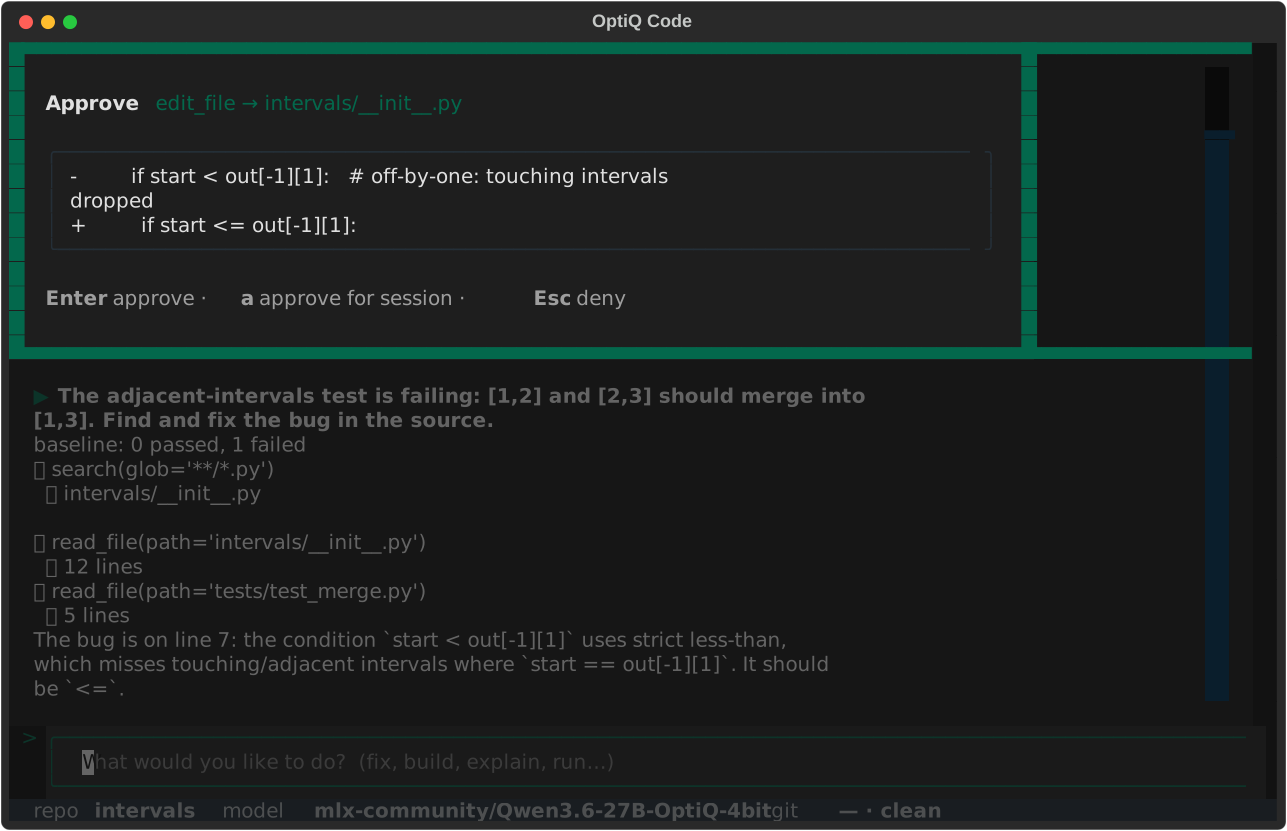
edit_file call paused for approval, with the diff shown before it is applied.What a denial does
A denied call is reported back to the model as rejected. It does not silently retry the same action; instead it takes the denial as a signal and tries another approach. A denial only costs a turn; it never results in a wrong write.
Auto mode
Auto mode runs every tool without pausing. Use it for a repo you trust, or for unattended and headless runs. Headless (-p) always uses auto-approve by definition, since there is no one at the keyboard.