Vision (image input)
mlx-optiq answers image and text prompts on the Gemma-4 and Qwen3.5 / Qwen3.6 families. The language tower is still OptiQ mixed-precision quantized and decoded by mlx-lm; the vision tower is vendored into mlx-optiq (no mlx-vlm runtime dependency) and kept at bf16 in a sidecar that rides alongside the quantized weights.
One artifact, two ways to load it
OptiQ stores the vision and audio towers, at bf16, in a sidecar file named optiq_vision.safetensors next to the quantized language shards. mlx-lm selects its weights with glob("model*.safetensors"), so it never matches the sidecar. The result is a single published repo that loads two ways:
| Loader | Reads | You get |
|---|---|---|
stock mlx-lm | model*.safetensors | Text-only model (sidecar ignored) |
| OptiQ | model*.safetensors + optiq_vision.safetensors | Full image + text |
There is no separate vision build. Vision stays at bf16 because 4-bit vision degrades OCR and fine detail; the language tower, where almost all of the size lives, is still fully quantized.
Supported models
Pre-built quants take image input today, across three vision architectures. Every preprocessing step and vision tower is vendored from mlx-vlm and reproduces its outputs to a maximum absolute difference of zero.
| Family | Models with image input | Vision tower |
|---|---|---|
| Gemma-4 | e2b, e4b, 12B, 26B-A4B, 31B | SigLIP tower (e2b/e4b/26B/31B); encoder-free unified backbone (12B) |
| Qwen3.5 | 0.8B, 2B, 4B, 9B, 27B, 35B-A3B | Qwen3-VL encoder |
| Qwen3.6 | 27B, 35B-A3B | Qwen3-VL encoder |
Nemotron 3 and MiniCPM5 are text-only and carry no sidecar. Audio input is not supported on any model.
Serving images
When a model carries the sidecar, optiq serve turns on image support automatically. Send an OpenAI-style image_url content part (a data URL or an http(s) URL):
optiq serve --model mlx-community/gemma-4-e2b-it-OptiQ-4bit

curl http://127.0.0.1:8080/v1/chat/completions \
  -H "Content-Type: application/json" \
  -d '{"messages":[{"role":"user","content":[
        {"type":"image_url","image_url":{"url":"data:image/png;base64,..."}},
        {"type":"text","text":"What is in this image?"}]}]}'
Text-only requests are unchanged: the vision path only runs when a request actually carries an image, so MTP speculation, mounted LoRA adapters, KV-cache quantization, and plain text generation all behave exactly as without it.
In the Lab
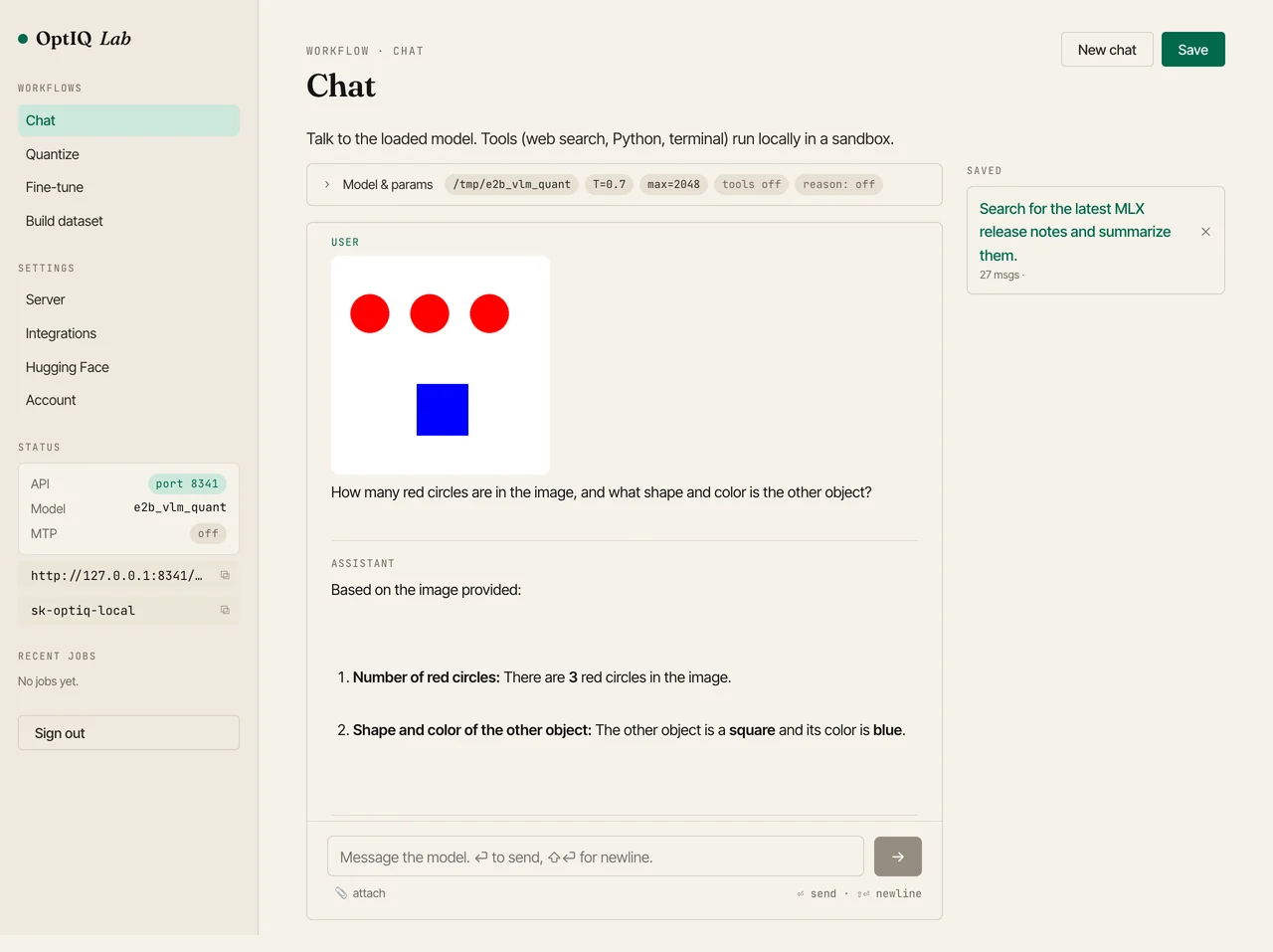
The Lab's Chat tab takes image uploads directly. Run optiq lab --model <sidecar-equipped quant>, open Chat, click attach, drop in a picture, and ask a question.
Python API
The engine takes images= (paths, URLs, data URLs, or PIL images) or a full messages= list with image_url parts:
from mlx_lm import load
from optiq.runtime.engine import OptiqEngine

model, tok = load("mlx-community/gemma-4-e2b-it-OptiQ-4bit")
eng = OptiqEngine.from_loaded(model, tok, "mlx-community/gemma-4-e2b-it-OptiQ-4bit")

st = eng.generate("What is in this image?", images=["cat.jpg"], max_tokens=128)
print(st.text)
Adding the sidecar to a quant
If you have an existing OptiQ language quant and the bf16 base it came from, attach a vision sidecar with one call. It extracts the bf16 vision and audio towers, writes optiq_vision.safetensors into the quant directory, and restores the multimodal config keys:
from optiq.vlm import build_vision_sidecar

build_vision_sidecar(
    base="google/gemma-4-e2b-it",        # bf16 base with the towers
    quant_dir="./gemma-4-e2b-it-OptiQ-4bit",  # existing OptiQ language quant
)
How it works
The vision front-end preprocesses the pixels, runs the vendored vision tower, projects the result into the language model's hidden space, and scatters those soft tokens into the text-embedding sequence at the image-placeholder positions. The merged embeddings go to mlx-lm's language model through its input_embeddings hook, and decode proceeds with the same quantized weights, KV cache, and sampler as text. mlx-optiq resolves the right front-end per model_type: gemma4 (SigLIP tower), gemma4_unified (the encoder-free 12B), and qwen3_5 (Qwen3-VL tower).
The vendoring is validated against mlx-vlm tensor for tensor: feeding mlx-vlm's own pixel values through mlx-optiq's preprocessing and vision tower reproduces its outputs to a maximum absolute difference of zero, on every architecture.
Each tower needs the backbone to treat its visual tokens correctly. For the SigLIP towers, the tokens are self-contained, so the standard causal decode is enough (one detail: gemma4_text rescales the incoming embeddings by embed_scale, so the vision features are pre-divided to compensate). The unified Gemma-4 12B has no separate tower and was trained to attend bidirectionally over the image span, so OptiQ makes that span bidirectional with a one-shot mask wrapper (text and decode stay causal). Qwen's tower already carries 2D rotary positions internally, so its visual tokens arrive position-aware and need nothing special from the backbone.