Accounts and billing
How you sign in, how a machine gets a key, and what the dashboard does with it. For what Boost is and how to use it, see Boost overview.
Signing in
Sign-in is Google only, and asks for nothing beyond your name and email address. That is deliberate: any sensitive or restricted scope would drag the project into Google's manual data-access review, and Boost has no use for your Drive or your mail.
The consent screen is company-level and verified, so you see an ordinary Google sign-in rather than an unverified-app warning.
The dashboard
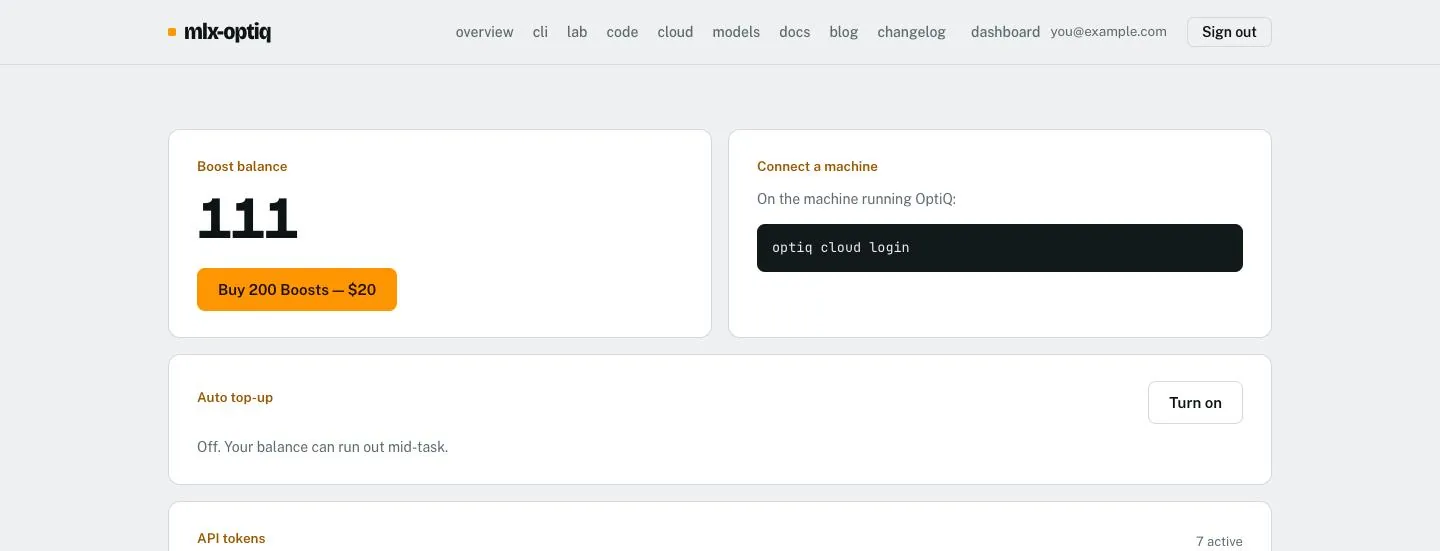
Four things, and deliberately not much else: your balance and a button to buy more, the command that connects a machine, auto top-up, and the list of machines you have connected.
Connecting a machine
A terminal cannot receive a browser redirect, so OptiQ uses the
device-code flow. Run this on the machine that runs
optiq serve:
$ optiq cloud login

  Your code:  EH4Y-67C6
  Approve at: https://cloud.mlx-optiq.com/link

Waiting for approval...
Connected. Token saved to ~/.optiq/code/config.json
Signed in as you@example.com - balance $2.00.
Type /boost in `optiq code` to have OptiQ Cloud lead a task with your local model as its helper, or pick the model optiq-boost in any client pointed at `optiq serve`.
Open that URL, check the code matches what your terminal printed, and approve. The check is the point: approving is what grants a machine the right to spend your balance, so a page that granted one merely by being opened would turn a forwarded link into an attack.
How the key reaches your coding agent
optiq cloud login writes the token into your OptiQ config, on
your machine. Two things read it from there:
- OptiQ Code, when Boost is on, uses it to call OptiQ Cloud directly.
optiq serveuses it when a client picks the modeloptiq-boost. Claude Code, Codex, OpenCode and the rest talk tooptiq servewith whatever local key they already used, and never see the cloud token.
So a compromised agent config leaks a local key, not a cloud credential, and pointing a new agent at OptiQ needs no secret at all.
~/.optiq/code/config.json, written 0600. It is
never placed in a repository file, and never sent to a model.
Machines and tokens
One token per machine. The dashboard lists the prefix, when each was last used, and a button to revoke it; only a hash is stored, so a token is shown once at issue and never again.
| Command | What it does |
|---|---|
optiq cloud status | Account and balance. |
optiq cloud logout | Revokes the token, then forgets it locally. |
optiq cloud logout --keep-remote | Forgets it locally only. |
Logout revokes by default because forgetting a working credential is not logging out: a laptop lost afterwards could still spend your balance.
Auto top-up
Off unless you turn it on. When on, it adds $20 of credit once your balance falls below a threshold you choose, up to a monthly cap you set.
The cap is the part that matters. Automatic spending without one is how a runaway loop becomes a surprising invoice, so the cap is checked in the same statement that claims the top-up, and several calls arriving at once cannot each start their own purchase.
What you are charged for
- The tokens each call to
optiq-boostused, at the per-token price, rounded up to the millionth of a dollar per call. - A call that failed before the model answered is not charged.
- Nothing else: no subscription, no per-task fee, no charge for tasks on your local model.
- Credit is bought $20 at a time and lasts 12 months from purchase. The $2 of credit at sign-up lasts 14 days.
- Boosts left over from before per-token billing were converted at $0.10 each.
The dashboard lists every recent task with its tokens and cost, so you can check any charge against the price.